ignite soft tech

Tosca Automation Testing

Covered Application

Tosca

Training Key Points:

About Tosca

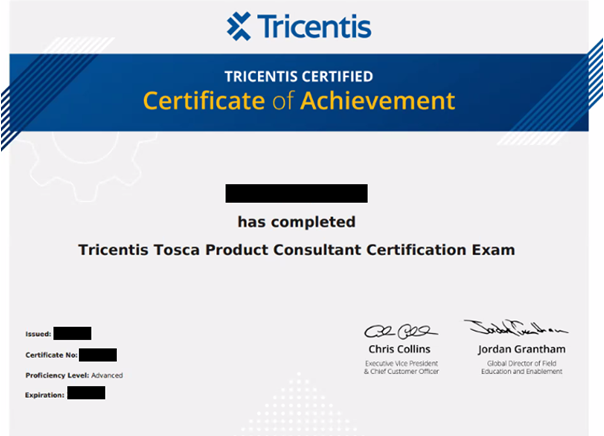
Tosca Commander is product of Tricentis using tosca we can automate 250+ types of testing like Web Application Automation, Desktop Application, Database Automation, Mobile Automation, ETL Testing Automation, Excel automation, SAP, Salesforce, API  Automation and all major automation it can automate Zero Code. Tosca will automate the Data Driven testing and without writing single piece of code we can automate all applications. Learn the skills required to develop and execute automation tests on diverse real-time applications.

Who Can Join the Course?

This course is suitable for any fresh graduates, BPO’s and working professionals seeking to learn and excel as Automation Test Engineers. Selenium is one the most used automation tool and high job opportunities automation tool in current market.

Register For Free Demo

Pre-requisites

NOTHING required. Come with empty mind, Ignitesoftech will fill your mind with Tosca Commander from Starch.

Tosca Commander

  • What is Software Testing?
  • Types of Testing
  • What is Manual Testing?
  • What is Automation Testing?
  • Difference Between Manual and Automation Testing?
  • Software Testing Life Cycle
  • What is Tricentis Tosca?
  • Introduction to Tosca
  • Benefits of Tosca Commanders
  • What type of Tool is Tosca?
  • What is Model based testing Technique?
  • Creation of new projects in Tosca
  • Components of Tosca
  • Section and components in Tosca
  • Settings and options in Tosca
  • How to download and install Tosca
  • Tosca Tool Overview
  • Tosca Commander
  • Tosca Executor
  • Tosca Xscan
  • Tosca Repository
  • Requirement Section
  • Test Planning Section
  • Modules Section
  • Testcases Section
  • TestCaseDesign (TCD) Section
  • Execution Section
  • Issues Section
  • Configuration Section
  • Best Practices of Tosca
  • Install Tosca Commander
  • Types of License in Tosca Commander
  • Info Option
  • Options
  • Settings
  • About Tosca
  • Accounts
  • License

Close Option

  • What is Single User Repository?
  • How to create Single User Repository?
  • What is Multi User Repository?
  • How to create Multi User Repository?
  • What is Create slim workspace
  • Uses of Create Slim workspace
  • How to handle Home,Ribbion and Record and Play
  • Checkout, Checkout Tree, Checkinall and Updateall
  • Requirements and requirements sets.
  • Requirement weight
  • How to calculate Requirement Weight?
  • Formula to calculate Weights
  • Requirement frequency and damage class
  • Requirements- Key points
  • Exercise
  • Introduction to Test Planning in Tosca
  • How to create a proper Test plan for project
  • How to create session Participants in Tosca?
  • How to create Tasks in Test planning section
  • Real time project Test Plan creation in Tosca
  • Introduction to Test Planning in Tosca
  • What is Single User Repositories
  • What is Multi User Repositories
  • How to create Single User Repositories
  • How to create Multi User Repositories
  • Introduction to Test Planning in Tosca
  • What is Folder Structure in Tosca
  • How to create folder Structure in Modules.
  • How to create folder Structure in Testcases.
  • How to create Sub folder Structure in Testcases.
  • Real Time project Folder Structure.
  • Close All Browsers
  • Clear All Browser Cache
  • Open Browser in Incogito Mode
  • Cross Browser Testing in Tosca
  • What is Action Modes in Tosca
  • Uses of Action Modes in Tosca
  • How to add Action Modes in Tosca
  • Types of Action Modes
  • What is Action Mode Buffer
  • What is Action Mode Constraint
  • What is Action Mode Waiton
  • What is Action Mode Select
  • What is Action Mode Insert
  •  
  • What are Modules in Tosca?
  • Types of Modules in Tosca
  • What are Standard Modules in Tosca?
  • What are XScan Modules in Tosca?
  • Tbox modules
  • Scan options
  • Identifiers in Tosca
  • Modules Folder Structure
  • Rescan Modules
  • Unmapped controls in Tosca
  • Duplicate Modules
  • Merge Modules in Tosca
  • What are Modules in Tosca?
  • Identify by Properties
  • Identify by Anchor
  • Identify by InDeX
  • Identify by Image
  • Identify by Parent Control
  • What is Testcase section
  • How to create testcases in Tosca?
  • Folder structure of testcase
  • TCP (Test Configuration Parameter)
  • How to create TCP
  • How to declare TCP
  • Syntex for TCP
  • Real time Testcase creation in Tosca
  • What is Buffer?
  • Type of Buffers in Tosca
  • Static Buffer in Tosca
  • Dynamic Buffer in Tosca
  • Buffer Operation in Tosca
  • What is Tbox Take screenshot
  • What is DokuSnapper
  • How to store Screenshots
  • How to retrieve the path and change the screenshots path .
  • Storing the Screenshots in Word
  • Analysing the Screenshots in Word
  • Uses of DokuSnapper in Real Time scenario
  • What is Error Handling in Tosca
  • How to handle Errors in Tosca
  • Types of Failure in Tosca
  • Verification Failure
  • Dialog Failure
  • User Abort Failure in Tosca
  • What is Onverification Failure.
  • How to handle Onverification Failure at testcases

     & Project Level

  • What is Waits in Tosca
  • Static wait
  • Dynamic Wait
  • What is Buffer
  • What is Static Buffer
  • What is Dynamic Buffer
  • What is Partial,Name,set ,Delete buffer in Tosca
  • What is Browser Popup’s
  • How to handle Browser Popup’s
  • How to handle Chrome popup’s
  • How to handle Edge popup’s
  • How to handle FireFox popup’s
  • How we will Handle popup’s with Conditions
  • What is Explicate Name?
  • How to handle multiple buttons using Explicate Name
  • What is Constraint InDeX
  • How to handle multiple Tab’s using Constraint InDeX
  • What is Avoid Snapper
  • How to Take screenshots of Failed Teststep
  • How to Automate Drag and Drop Scenario
  • How to handle Single values Drag and Drop
  • How to handle Multiple values Drag and Drop
  • How to Handle a Dropdown
  • How to Handle Short Dropdown
  • How to Handle Long Dropdown Method-1
  • How to Handle Long Dropdown Method-2
  • How to Get ResultCount of Dropdown
  • Minimize & Maximize browsers
  • Scrolling behavior
  • Save As
  • Copy to Clipboard
  • Tbox Start Program
  • What is Random Number
  • How to create Random Number(RND)
  • RandomDecimal
  • Random Text
  • What is Regular Expression
  • How to generate Random number with specific

     digits or characters

  • Maximum Random Number with Regular Expression
  • Extract the name, value and number using Regular Expression
  • Split the Text using Regular Expression
  • What is Generic Folder
  • String to Lower
  • String to Upper
  • Trim
  • StringLength
  • StringReplace
  • NumberofOccurances
  • StringReplace
  • Date Expression
  • Time Expression
  • Date Time Expression
  • Date Syntax
  • Date Formatting
  • Future Date
  • Past Date
  • Add, remove days, years, Months in Current Date
  • Day
  • Month
  •  
  • Adding two numbers using Calc() Function
  • PODAMS Rule in Calc()
  • Adding value to buffer in Calc()
  • Adding Two buffers using Calc()
  • Adding Three buffers using Calc()
  • Calculate Length using Calc()
  • Trim using Calc()
  • Upper and Trim using Calc()
  • Adding two numbers using Math() Function
  • PODAMS Rule in Math()
  • Adding value to buffer in Math()
  • Adding Two buffers using Math()
  • Adding Three buffers using Math()
  • Power using Math()
  • Max using Math()
  • Min using Math()
  • Square, Abs, Truncate, Ceiling, Floor
  • Passing values using SendKeys
  • Sending Values in Input Values
  • Sendkeys with CP(Configuration Parameter)
  • TextInput usage
  • Copy, Cut, Paste the Value using Tbox SendKeys
  • BackSpace
  • Uses of SendKeys
  • Close Browser using SendKeys
  •  
  • What is Reusable TestStepBlock(RTB)
  • What is Library in Tosca
  • Uses of RTB and Libraries
  • What is Business Parameter
  • Uses of Business Parameters
  • Syntax of BP(Business Parameter)
  • If Conditions in Tosca
  • IF-Then-Else
  • While Loop
  • Do Loop in Tosca
  • What is Repetitions in Tosca
  • Uses of Repetitions
  • How to set Maximum Repetitions
  • Repetitions at Folder and teststep Level
  • How to Handle WebTables
  • How to steer the values for WebTables
  • Scanning the Web Tables
  • Row Count
  • Column Count
  • ResultCount
  • Storing and Verifying webtables data
  • Real Time Tables steering Examples
  • What is Recovery Scenario
  • How to add Recovery Scenario
  • Uses of Recovery Scenario
  • Drag and Drop testcases or Folders in Recovery Scenario
  • How to take screenshot of Recovery
  • Recovery Scenario declaration
  • Global Settings
  • Where we need to declare Recovery Scenario
  • Where exactly recovery and Cleanup Scenario Works either Execution List or Testcases
  • What is Execution List Section
  • How to drag the Testcases into Execution List
  • How to run multiple testcases in Execution List
  • How to generate Reports
  • Difference b/w Scratch book and Execution List
  • How to create Execution Folder, Execution List and

    run the testcases

  • What is Test Mandate
  • Uses of Test Mandate
  • Create a Test Mandate
  • Real time Example sif Test Mandates
  • What is Data Driven testcases
  • What is TCD section
  • How to create Test Design Folder
  • How to create Test Design Sheet
  • Create Instances
  • Attributes
  • Link TCD to Testcases
  • Generate Instances
  • instantiation in TCD
  • Reinstantiation in TCD
  • Update the Values in TCD
  • Excel Data Design Framework
  • Test Data Services
  •  
  • Excel Operations
  • TBox Open Excel Workbook
  • TBox Define Excel Range
  • TBox Create Excel Worksheet
  • TBox Delete Excel Worksheet
  • TBox Update Excel Worksheet
  • TBox Excel Range Manipulation
  • TBox Excel Clear Range
  • TBox Run Excel Macro
  • TBox Close Excel Workbook
  • TBox 1:1 File Compare
  • Write the Testdata in Excel Automation in Tosca
  • Verify and buffering the Values in Excel Sheet
  • Real Time Examples
  • Manual Testcases
  • Record and Play option
  • Automated Test Cases & Exploratory Scenario
  • TBox Create Folder
  • TBox Copy Folder
  • TBox Delete Folder
  • TBox Folder Existence
  • Click Operation – {Click}
  • Define the click position for CLICK
  • Difference between Click and X or x
  • Jump
  • Smooth
  • HorizontalFirst
  • VerticalFirst
  • DOUBLECLICK
  • DRAG
  • DROP
  • LONGCLICK
  • MOUSEOVER
  • RIGHTCLICK

Advanced Topics in Tosca

  • What is Distributed Execution (DeX)
  • DeX Setup and Execution
  • How to link Testcases to DeX
  • Benefits of Tosca Dex
  • Dragging testcases from Execution List to Test Event
  • What is Test Event
  • Configuration Section in Tosca
  • How to link Configuration to Test Event
  • Why DeX is Required
  • DeX with AOS
  • DeX Server Installation
  • Install DeX Server
  • Agent Machine Set Up
  • Connect proxy server to Agents (optional)
  • Agent Configuration
  • TOSCA Commander Set Up
  • Test Event Creation & Configuration
  • Generate the Reports of Execution List
  • Agent Viewer & Execution Viewer

Tosca Vision AI

  • What is Vision AI in Tosca
  • How Vision AI is Useful in Testing
  • How the Vision AI will Work
  • How to Scan Vision AI modules
  • Vision AI scanning an Screenshot
  • Running Vision AI Scanned modules over Desktop application
  • Running Vision AI Scanned modules over Web application
  • Can we parallel automate the application while Developer developed the code.
  • Real Time Examples of Vision AI
  • Latest Update on Vision AI

TDS(Test Data Services)

  • What is TDM?
  • What is TDS(Test Data Services)
  • Why Use Tricentis Test Data Service?
  • What Are Test Data Service Modules?
  • Standard TDS Modules Overview
  • TestData – Find & provide item
  • TestData – Create & provide new item
  • TestData – Update item
  • TestData – Move item to type
  • TestData – Delete item
  • TestData – Import items
  • TestData – Export items
  • TestData – Update type
  • TestData – Expert module
  • Setting TDS Repository

Tosca TQL

  • What is Simple Search
  • How to search modules using Simple Search
  • What is TQL?
  • How to write TQL in Tosca?
  • How to search Modules using TQL?
  • How to search Testcase using TQL?
  • How to search Execution List using TQL?
  • How to add conditions in TQL?

Tosca TC Shell

  • What is TC Shell?
  • What is Interactive Mode in TC shell?
  • Setup and steps of TC shell with Tosca
  • How to create a workspace using TC Shell
  • TC Shell with Tosca
  • Importance of TC Shell in Tosca

Database Testing

  • What is Database Testing
  • How to do DB Connectivity
  • How to link Database with Tosca
  • Database Real Time Examples
  • DB Standard Modules
  • TBox DB Open Connection
  • TBox DB Current Connection
  • TBox DB Close Connection
  • TBox DB Run SQL Statement
  • TBox DB Expert module

Tosca SAP

Chapter -1:- Introduction of Tosca
  • What is SAP Automation
  • Approach for SAP Automation
  • SAP Modules and SAP Testing Tools
  •  
Chapter -2:- SAP Folder Structure
  • What is SAP Folder Structure
  • How to Maintain a Folder Structure for SAP
Chapter -3:- SAP Setup
  • How to Install SAP.
  • How to Handle SAP for 32/64 bit
  • Credential of SAP
  • Setup SAP Logon pad
  • Setup SAP IDES System
Chapter -4:- SAP Standard Modules
  • SAP Login
  • SAP Logon
  • SAP Menu
  • SAP Multiple Logon License Warning
  • SAP Statusbar
  • SAP SubToolBar
  • SAP Toolbar
  • SAP TreeView
  • SAP Logon – Open with Solution Manager
  • SAP Emulated Tree
  • SAP Emulated Table Tree
  • SAP Testcases Preparation and Execution
Chapter -5:- SAP Scanning
  • How to Scan SAP Modules
  • Uniquely Identify the SAP Modules
  • Relative ID In SAP
  • SAP Module Scan in SD Environment
Chapter -6:- SAP Real Time Scenarios/Live Examples
  • SAP Automation | Logon and Logoff with Verification
  • Verify whether the SAP Log Off button is Exits or not
  • SAP Menu Positive Scenario
  • SAP Menu Negative Scenario
  • SAP Log Off| Click on the LogOff button
  • SAP Automation Click on List of Sales Order
  • VA01- Generate and Verify Sales orders
  • SAP Automation Handling the tables
  • SAP Automation Handle the Dynamic Text
  • SAP Automation Buffer the Values
  • SAP Automation Dynamic Text or Dynamic buffer handling | Capture the Text
  • SAP Automation | Verify Empty Values
  • SAP Automation Capture the Description and verify it is as expected or Not
  • SAP Automation TCD linking and Creating SAP Multiple Modules
  • VA01- Generate and Verify Sales Order • VL01N-Create Outbound Delivery
  • LT03-CreateTransferOrder
  • VL02N-Change Outbound Delivery
  • VF01- Create Billing Document
  • VF03-Display Billing Document & Perform a Baseline

API Testing

Chapter -1:API Testing Introduction
  • What is an API Testing?
  • Different Layers in API
  • API Manual Testing
  • Overview of Tosca API
  •  
Chapter -2:- Types of API’s
  • Types of API’s
  • What is Web Services and Rest Services
  • What is SOAP Services
  • What is XML, JSON Payload
  • HTTP Status Codes
  • Request /Response
Chapter -3:- Leveraging Methods in API
  • Post Method
  • Put Method
  • Get Method
  • Delete method
  • Head Method
Chapter -4:- Tosca API Scan Feature
  • RecordAPIs
  • File
  • URL
Chapter -5:- Tosca API Scan Feature
  • Tosca API Scan and API Scan Result.
  • Tosca Export and API Modules Assigning the Parameters
  • API Test Cases Execute API Test Case
Chapter -6:- Using Authentication API scan & Tosca for API tests
  • Get Bearer Token
  • Tosca Export
  • API Modules Assigning the Parameters
  • API Test Cases Execute API Test Case
Chapter -7:-  Using Record API scan & Tosca for API tests
  • Tosca API Scan both File and URL
  • API Scan Results Checking
  • Tosca Export into testcases and Modules
  • API Modules Assigning the Parameters
  • API Automation Test Cases via Tosca
  • ExecuteAPITestCase in Tosca

CICD with Jenkins

  • What is Jenkins?
  • How CI/CD Integrated Tosca with Jenkins
  • What is Execution Client?
  • How we will integrate Tosca with Jenkins
  • Execute Test event with execution Client
  • Integrate Jenkins with Execution Client
  • How to schedule jobs using Jenkins
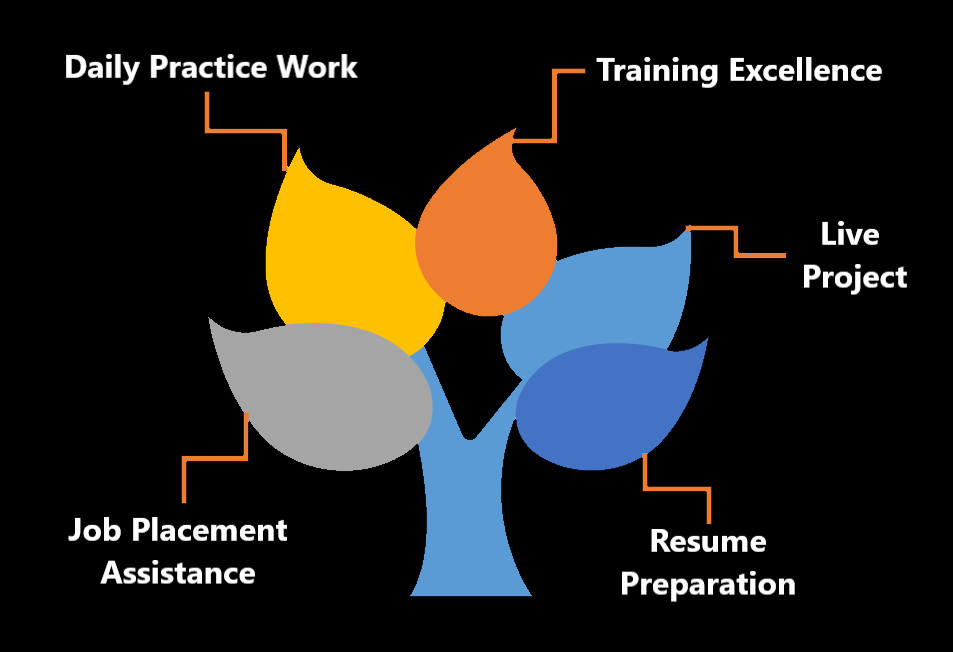
Daily Practice Work
Job Placement Assistance
Training Excellence
Live Project
Resume Preparation

About IgniteSofttech

Ignitesofttech is a premier training institute dedicated to providing comprehensive software testing education and preparing individuals for successful careers in the field. With a focus on industry-relevant skills and practical knowledge, Ignitesofttech stands out as a leader in software testing training. From manual testing to automation testing, performance testing to mobile app testing, their curriculum is designed to address the complete spectrum of software testing techniques and methodologies. Students can choose courses based on their interests and career goals, ensuring a tailored learning experience.

Contact Us

Tosca Brochure

Please enable JavaScript in your browser to complete this form.

Enroll Now

Please enable JavaScript in your browser to complete this form.